Industrial Panel PCs: What to Check Before Replacing a Faulted Unit
There’s a moment every maintenance tech knows well: a panel PC that’s been running the same SCADA screen for twelve years finally gives out, and suddenly you’re staring at a machine you can’t just walk into a store and buy again. Industrial panel PCs don’t fail often, but when they do, it’s rarely a simple like-for-like swap.
Part of the problem is that these units sit somewhere between a standard computer and dedicated industrial hardware. They need the ruggedness of a control panel component but also have to run software, an OS, drivers, sometimes a specific SCADA package, that has its own compatibility quirks.
Why Industrial Panel PCs Are Trickier to Replace Than Other Hardware
A PLC or an HMI panel is largely self-contained. A panel PC, on the other hand, is running a full operating system underneath whatever interface you actually see on the screen. That means a hardware swap isn’t the end of the job, you’re also dealing with driver compatibility, licensing, and whatever software was originally installed.
This is exactly why sourcing industrial panel PCs takes a bit more planning than swapping a simple I/O module. Get the hardware wrong, or fail to account for the software side, and you can end up with a working screen that can’t actually run what it’s supposed to.
Panel PC Types at a Glance
| Type | Typical Use | Key Consideration | Common Mistake |
|---|---|---|---|
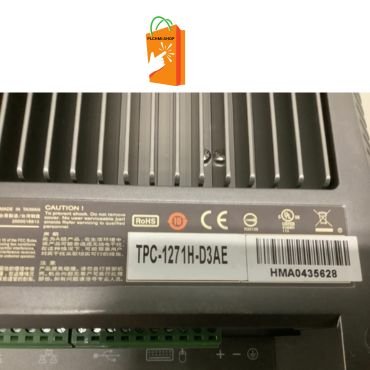
| Computer-board style (e.g. Advantech TPC) | Full SCADA/HMI software, industrial computing | OS and driver compatibility | Ordering hardware without checking the installed software’s requirements |
| Touchscreen industrial computer | Operator interface with local processing | Mounting depth, connector layout | Assuming screen size alone determines fit |
| HMI-integrated panel PC (e.g. Weintek) | Combined display and control logic | Firmware and project file compatibility | Skipping a backup of the existing project before replacement |
1. Confirm What Software Is Actually Running on the Unit
Before ordering a replacement, find out exactly what’s installed, the operating system, the SCADA or HMI software, and any licensing tied to that specific machine. An Advantech panel PC running an older OS version might not support the same software without an upgrade, and that upgrade path isn’t always straightforward on legacy systems.
It helps to check this while the old unit is still functioning, if at all possible, rather than after it’s already failed and you’re troubleshooting blind.
2. Match Mounting Depth and Connector Layout, Not Just Screen Size
Screen size tells you almost nothing about whether a replacement will actually fit. An industrial touchscreen computer can vary significantly in mounting depth and connector placement even within similar screen dimensions, and a unit that’s too deep simply won’t close inside the enclosure it’s meant to sit in.
Measure the existing cutout and the available depth behind the panel door before ordering anything, the same way you would for a standard HMI replacement.
3. Back Up the Existing Project or Configuration First
If the panel PC is running an integrated HMI project rather than a full SCADA install, the project file itself is often more valuable than the hardware. A Weintek HMI panel PC running years of accumulated screen customizations and logic can be a real headache to rebuild from scratch if there’s no backup available.
Whenever a unit is still functioning, even intermittently, it’s worth pulling a fresh backup immediately rather than waiting for a full failure to force the issue.
4. Consider a Rugged Option for Harsh Environments
Standard panel PCs can struggle in environments with heavy vibration, dust, or temperature extremes. A rugged panel PC is built with wider environmental tolerances specifically for these conditions, and it’s worth the extra consideration if the previous unit failed prematurely due to its physical environment rather than simple age.
5. Buy From a Supplier Who Can Confirm Condition and Compatibility
Used panel PCs carry more variables than a simple I/O module, storage drive health, OS licensing status, and physical wear on connectors and touchscreens all matter. Ask a supplier directly what’s been tested, powered on and verified, or fully load-tested with software installed, before you commit to a purchase.
For general background on how these devices fit into a broader control architecture, the Wikipedia overview of industrial PCs is a useful starting reference if you’re weighing this category against a standard HMI or PLC-based setup.
Frequently Asked Questions
Q: Can I just move the hard drive from a failed panel PC into a replacement unit?
A: Sometimes, if the hardware is close enough in generation and driver compatibility lines up, but it’s not guaranteed to work cleanly. A fresh install with a verified backup of the software and project files is usually the more reliable path.
Q: How is a panel PC different from a standard HMI touch panel?
A: A panel PC runs a full operating system and general-purpose software, like SCADA platforms, while a standard HMI touch panel runs dedicated firmware built specifically for a single interface application. Panel PCs offer more flexibility but come with more software maintenance.
Q: Why does my panel PC run hot or shut down unexpectedly?
A: This is often a sign of a failing cooling fan, dust buildup, or an environment exceeding the unit’s rated operating temperature. Rugged, fanless designs are worth considering for facilities with heat, dust, or vibration concerns.
Q: Do I need to reinstall software after replacing a panel PC’s hardware?
A: In most cases, yes, unless you’re transferring a compatible drive directly. Having a current backup of your software installation and project files makes this process far faster than rebuilding everything from scratch.
Replacing industrial panel PCs takes more planning than a typical hardware swap, since the software running on the unit matters just as much as the physical box. Confirm what’s installed, back up your project files early, and match mounting and environmental requirements before you order a replacement.