Industrial Power Meters: How to Pick the Right Panel Meter for Your Plant
Most facilities don’t think about industrial power meters until something forces the issue, an energy audit, a utility billing dispute, or a panel meter that’s finally given out after fifteen years of service. At that point, the question isn’t really “do I need a meter,” it’s “which one actually fits what I’m trying to measure.”
That decision is more nuanced than it looks. Panel meters range from basic single-phase voltage displays to full multifunction units tracking harmonics, power factor, and demand across dozens of parameters. Picking the wrong one means either overpaying for capability you’ll never use, or under-buying and finding out later you need data the meter simply can’t provide.
Why Industrial Power Meters Aren’t One-Size-Fits-All
The term “power meter” covers a huge range of hardware. A basic unit might only display voltage and current on a small LCD screen. A full multifunction meter, on the other hand, can log power quality events, communicate over Modbus or Ethernet, and feed data directly into a plant-wide energy management system.
Buying industrial power meters without first defining what you actually need to measure is one of the most common and costly mistakes in a panel upgrade. Swapping a meter later usually means re-wiring current transformers and re-configuring communication settings all over again, which turns a simple upgrade into a half-day job.
This is why it pays to slow down at the start of the process. A five-minute conversation about what data actually needs to leave the panel, local display only, or feeding a plant-wide dashboard, saves a lot of rework down the line.
1. Start With What You Actually Need to Measure
Some applications only need basic voltage, current, and power readings for a quick check at the panel. Others need full power quality monitoring, harmonics, sags, swells, and transient logging, especially near sensitive electronics or large variable frequency drives.
A basic single-phase panel meter is often enough for straightforward monitoring points where nobody needs historical trending or alarm logging. If the goal is catching power quality issues affecting other equipment on the same feeder, though, that basic display won’t cut it, and you’ll end up buying a second meter to fill the gap later.
It helps to write down, in plain language, what question the meter needs to answer. “Is this circuit overloaded right now” calls for something very different than “why do we keep tripping breakers during startup.”
2. Match the Communication Protocol to Your System
This is where a lot of meter purchases go wrong. A meter that displays perfectly on its local screen is only half useful if it can’t talk to the rest of your monitoring system. Modbus RTU, Modbus TCP, and Ethernet/IP are all common, but not every meter supports every one of them, and not every plant’s existing infrastructure speaks the same language.
A Modbus-ready multifunction power meter is a good example of hardware chosen specifically because it needed to report into a central system, not just display locally. Before ordering, confirm what protocol your SCADA platform or historian actually expects, and buy hardware that speaks that language natively rather than relying on a protocol converter as a workaround.
3. Check Physical Mounting and Panel Space First
It sounds basic, but mounting depth and cutout size cause more return shipments than almost any other factor. Panel meters vary significantly in physical depth, especially between older analog-style units and newer digital multifunction meters with larger displays and additional terminal blocks on the back.
Measure the existing cutout and the available depth behind the panel door before ordering a replacement, not just the meter’s front bezel dimensions. A meter that’s an inch too deep won’t let the panel door close, and that’s not something you want to discover after the old unit has already been pulled and the line is waiting to come back up.
4. Consider Circuit Monitors for Larger Distribution Panels
For larger switchgear and distribution panels, a dedicated circuit monitor often makes more sense than a standard panel meter. These units are built to handle higher-level monitoring across multiple circuits at once, rather than a single point measurement.
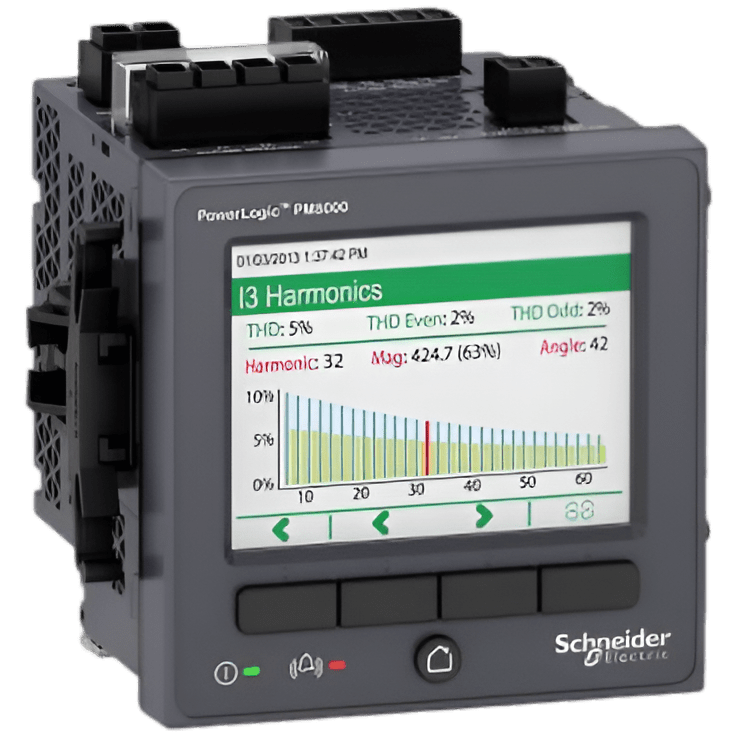
A PowerLogic circuit monitor is built specifically for that larger-scale application, where a basic panel meter would fall short on both input capacity and data logging depth. If you’re monitoring an entire switchboard rather than a single feed, this category of hardware is usually the better starting point.
5. Buy From a Source That Confirms Firmware and Calibration
Used and refurbished meters are generally reliable, but calibration drift and firmware mismatches are two issues that aren’t visible from a listing photo. A meter that reads slightly off on voltage or current isn’t just an inconvenience, it can throw off billing calculations or trigger false alarms in a monitoring system relying on accurate data.
Browse the full industrial power meters catalog and ask directly whether a specific unit has been bench-tested and calibrated before it ships, especially if it’s going into a billing-critical application.
For general background on how these devices fit into a facility’s electrical monitoring setup, the Wikipedia overview of electric power metering is a solid general reference, and Schneider Electric’s own PowerLogic product documentation is worth checking for exact specs before you commit to a specific model.
Frequently Asked Questions
Q: What’s the difference between a basic power meter and a multifunction power meter?
A: A basic meter typically displays voltage, current, and power on a local screen. A multifunction meter adds power quality monitoring, data logging, and communication capability, letting it report into a larger energy management or SCADA system rather than only displaying locally.
Q: Do I need a meter with Ethernet communication, or is Modbus RTU enough?
A: It depends on your existing infrastructure. If your monitoring system is already built around Modbus RTU, adding Ethernet capability may not be necessary. If you’re building a new system or need faster polling across many devices, Ethernet-based communication is usually the better long-term choice.
Q: Can I reuse the existing current transformers when replacing a power meter?
A: Often yes, as long as the new meter’s input ratings match the existing CT ratio. It’s still worth verifying this before ordering, since a mismatch here can produce inaccurate readings even if the meter itself is functioning correctly.
Q: How often should industrial power meters be recalibrated?
A: This varies by application, but facilities using meters for billing or regulatory reporting typically recalibrate on a scheduled interval, often annually. For general monitoring purposes without billing implications, calibration checks are usually less frequent.
Choosing the right industrial power meters comes down to matching the hardware to what you’re actually trying to measure, not just replacing what was there before with something similar. Define your monitoring needs first, confirm the communication protocol matches your system, and buy from a supplier that can confirm calibration before it ships.