Modicon M340 Parts: 5 Compatibility Mistakes to Avoid When Replacing Modules

The Modicon M340 platform sits in an odd spot for a lot of facilities. It’s newer than the older 140-series Quantum racks, but it’s been around long enough that early modules are starting to show their age, and Schneider has already moved a chunk of its current lineup toward the M580 platform instead.
That transition period is exactly where compatibility mistakes happen most. Someone orders a Modicon M340 parts replacement expecting a straightforward swap, only to find out the module they bought doesn’t match the backplane revision, the firmware, or the rack it’s going into.
Why Modicon M340 Parts Cause More Mix-Ups Than Older Systems
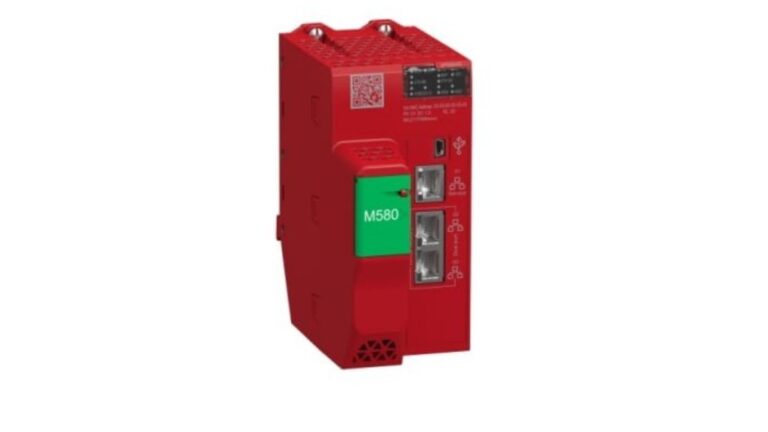
Because the M340 and M580 platforms overlap in the market right now, it’s easy to confuse the two when sourcing parts. A module that looks nearly identical on a shelf photo can belong to a completely different generation, with different mounting, addressing, and communication behavior.
This is compounded by the fact that many facilities are running a mix of both platforms across different lines, sometimes even within the same plant. Ordering Modicon M340 parts without double-checking the platform generation is one of the fastest ways to end up with a module that simply won’t integrate with the rest of the rack.
1. Confirm the Platform Before Anything Else
Before checking part numbers, confirm whether you’re actually on M340 or M580 hardware. A M340 CPU module and an M580 processor might get referred to interchangeably by staff who aren’t deep in the platform details, but they’re not cross-compatible, and ordering the wrong one wastes both time and money.
If there’s any doubt, pull the processor and read the exact model designation off the unit itself rather than relying on what a spreadsheet or an old work order says.
2. Match Backplane Revision, Not Just Rack Size
Slot count alone doesn’t guarantee compatibility. Backplane revisions within the same platform can differ enough that a module seats physically but fails to communicate correctly, or triggers intermittent faults that are hard to trace back to the actual cause.
This is one of the more frustrating failure modes because everything looks correct from the outside. Before ordering a new backplane or rack section, cross-reference the revision against what’s already installed rather than assuming a matching part number guarantees full compatibility.
3. Check Analog and Specialty I/O Signal Types Carefully
Analog modules are where small mismatches cause the most downtime. An analog input module needs to match signal type, voltage or current range, and isolation requirements, not just fit the physical slot correctly.
Swapping in a module with the wrong signal range doesn’t always throw an obvious fault. Sometimes it just produces subtly wrong readings that don’t get noticed until a downstream process starts behaving strangely, which makes this one of the harder mistakes to catch quickly.
4. Don’t Assume M580 Modules Are a Drop-In Upgrade Path
If you’re considering moving from M340 to M580 as part of a planned upgrade rather than an emergency swap, don’t assume it’s a simple module-for-module replacement. A M580 CPU module offers a different architecture with its own programming environment considerations, and existing M340 logic typically needs review and conversion rather than a direct transfer.
This kind of upgrade is worth planning during a scheduled outage rather than attempting on the fly, since the programming and communication differences between the two platforms are significant enough to require proper testing time.
5. Buy From a Supplier Who Tests Modules Before Shipping
Both new and used Modicon M340 parts carry some risk if they haven’t been verified before shipping. A module that looks physically fine can still have a failed internal component that only shows up once it’s powered on and communicating with the rest of the rack.
Browse the full Modicon M580 category for tested stock, and ask directly whether a specific module has been bench-tested rather than just visually inspected before it ships.
For general background on how PAC platforms differ from traditional PLCs, the Wikipedia overview of programmable automation controllers is a useful primer, and Schneider Electric’s own Modicon product documentation is the best source for confirming exact compatibility between generations.
Frequently Asked Questions
Q: Can M340 and M580 modules be mixed in the same rack?
A: No, the two platforms use different backplanes and are not designed to share a rack. If you’re running both, they need to exist as separate systems, even if they’re integrated together at the network level.
Q: How do I tell if a failing module is an M340 or M580 part just by looking at it?
A: The clearest way is reading the full model designation printed on the module itself. Visual similarities between the platforms make this the most reliable method, rather than relying on rack appearance or slot position alone.
Q: Is it worth upgrading from M340 to M580 during a routine parts replacement?
A: Usually not during an emergency repair, since the platforms require different programming environments and testing. A planned migration during a scheduled outage is a better approach than trying to upgrade reactively.
Q: Are refurbished Modicon M340 parts a safe option for critical racks?
A: Yes, as long as they’ve been properly bench-tested before shipping. Testing matters far more than whether the part is new or refurbished, since an untested new part can fail just as easily as a properly verified used one.
Sourcing Modicon M340 parts correctly means confirming the platform generation first, checking backplane and signal compatibility carefully, and treating any move toward M580 as a planned migration rather than a reactive swap. Buy from a supplier that verifies modules before they ship, and you’ll avoid most of the compatibility headaches that come with this transition period.