Altivar VFD Parts: 6 Things to Check Before Replacing a Faulted Drive
A tripped drive rarely gives you much warning. One minute a motor is running fine, the next it’s faulted out and the line is down. That’s when the search for Altivar VFD parts usually starts, and it’s a search that moves fast, because a stopped motor often means a stopped process.
Schneider Electric’s Altivar drives cover a wide range of generations, from older ATV58 and ATV28 series units to the newer ATV71 and ATV930 platforms. Knowing which parts actually match your drive, and which ones are safe to substitute, makes the difference between a quick fix and a much longer troubleshooting session.
Why Altivar VFD Parts Vary So Much Between Generations
Variable frequency drives aren’t as interchangeable as they look. Even within the same physical frame size, control boards, power ratings, and firmware can differ enough that a part from one generation won’t function correctly in another, or won’t fit the mounting at all.
This matters more with Altivar VFD parts than with a lot of other automation hardware, because a drive isn’t just a passive component, it’s actively controlling motor speed, torque, and protection settings. A mismatched replacement doesn’t just fail to work, it can put unexpected strain on the motor it’s driving.
1. Confirm the Exact Drive Model and Rating
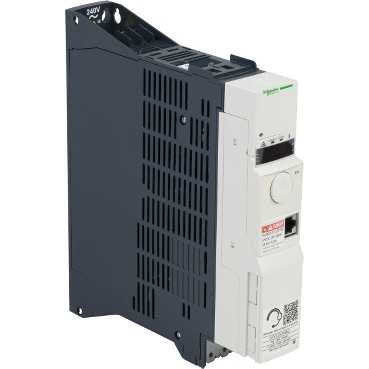
Before ordering anything, check the full nameplate on the drive itself, model number, voltage class, and horsepower or kW rating. An ATV71 variable frequency drive and an older ATV58-series unit might sit in the same enclosure footprint but aren’t remotely compatible internally.
Even within the same series, power rating matters as much as the model number. A drive sized for a smaller motor won’t handle the inrush or continuous current of a larger one, even if it physically bolts into the same mounting holes.
2. Don’t Overlook Soft Starters When Troubleshooting Motor Faults
Not every motor control issue traces back to the VFD itself. Many systems pair drives with soft starters for specific applications, and a failing soft starter can produce symptoms that look like a drive problem at first glance.
An ATS48 soft starter handles ramp-up current differently than a VFD does, so if you’re seeing inconsistent startup behavior on a motor, it’s worth checking which control device is actually in the circuit before assuming the drive needs replacing.
3. Check Accessory and Communication Cards Separately
Drives often fail at the accessory level long before the main power section gives out. Communication cards, braking accessories, and control terminal expansion cards are common failure points that get misdiagnosed as a full drive failure.
An Altivar drive accessory kit covering these smaller components is worth checking first if a drive is throwing communication faults or losing its network connection intermittently, rather than assuming the whole unit needs to be swapped.
4. Watch for Firmware and Parameter Mismatches
Even a physically correct replacement drive can behave unexpectedly if the parameter set doesn’t match your application. Acceleration ramps, current limits, and protection thresholds are all configured in software, and a factory-default drive won’t automatically match the tuned settings of the unit it’s replacing.
Before commissioning a replacement, have your original parameter sheet or a backup file ready. Reconfiguring a drive from scratch on the fly, during an unplanned outage, is a common source of nuisance trips in the days after a swap.
5. Check for Migration Paths on Older Drive Families
Some older Altivar families have documented migration paths to newer equivalents, with cross-reference guides covering wiring differences and parameter mapping. If you’re dealing with a drive that’s fully discontinued rather than just hard to find, it’s worth checking whether Schneider has published a migration guide before assuming a like-for-like replacement is your only option.
This is especially useful for facilities planning ahead rather than reacting to an emergency, since a documented migration path can save significant commissioning time compared to working it out from scratch.
6. Buy From a Supplier Who Tests Before Shipping
Used and refurbished Altivar VFD parts are common in the secondary market, and reliability comes down almost entirely to how thoroughly a unit was tested before it shipped. A drive that powers up but hasn’t been load-tested can still fail once it’s actually driving a motor under real conditions.
Reach out through the contact page if you need help confirming an exact part number or checking whether a specific drive has been bench-tested before you order.
For general background on how variable frequency drives work, the Wikipedia overview of VFDs is a solid reference, and Schneider Electric’s own Altivar product documentation is the best place to confirm exact specs and firmware compatibility.
Frequently Asked Questions
Q: Can I replace an older Altivar drive with a newer model without reprogramming?
A: Rarely without some reconfiguration. Even drives in the same power range often use different parameter structures between generations, so plan on reviewing and re-entering key settings during commissioning.
Q: How do I know if a VFD fault is actually a drive problem or a motor problem?
A: Check the fault code against the drive’s manual first, many fault codes point specifically to overcurrent, overvoltage, or thermal issues that can originate from the motor, the wiring, or the drive itself. Isolating the motor and testing the drive against a known-good load can help narrow it down.
Q: Are used Altivar VFD parts reliable for critical applications?
A: They can be, provided the supplier has bench-tested and, ideally, load-tested the unit before shipping. For critical applications, ask specifically about testing procedures rather than assuming a “tested” label covers full load verification.
Q: What information should I have ready before ordering a replacement drive?
Matching Altivar VFD parts correctly takes more than finding something that looks similar on a shelf. Confirm the exact model and rating, check soft starters and accessory cards before assuming the whole drive failed, and buy from a supplier that tests before it ships.
Matching Altivar VFD parts correctly takes more than finding something that looks similar on a shelf. Confirm the exact model and rating, check soft starters and accessory cards before assuming the whole drive failed, and buy from a supplier that tests before it ships.