Industrial Ethernet Switches: How to Pick the Right ConneXium Switch
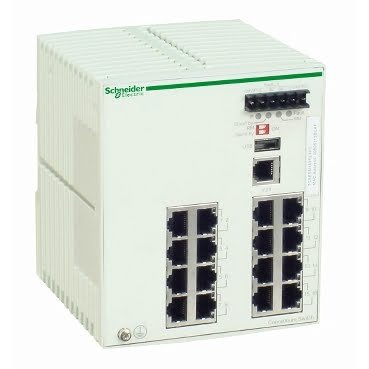
Most people don’t think about the network switch until the whole control system starts acting up, communication timeouts, dropped connections, HMI screens that freeze intermittently. In a lot of cases, the PLC and HMI are both fine, and the actual problem is sitting in an overlooked switch that’s failing or was never sized correctly for the network in the first place.
Picking the right industrial Ethernet switches matters more than it gets credit for, because every device on a control network, PLCs, HMIs, drives, remote I/O, depends on that switch passing data reliably.
Why Industrial Ethernet Switches Need Different Specs Than Office Networking Gear
A switch built for an office network isn’t built for a control cabinet. Industrial switches need to handle wider temperature ranges, vibration, and electrical noise that would cause consumer-grade networking equipment to fail within months on a plant floor.
Beyond the physical ruggedness, industrial Ethernet switches used in automation networks often need to support specific features, like managed diagnostics or fiber connectivity for long cable runs, that consumer switches simply don’t offer.
1. Decide Between Managed and Unmanaged Switches
An unmanaged switch is plug-and-play, no configuration, no diagnostics, just basic connectivity. That’s fine for a small, simple network, but it gives you no visibility if something starts failing intermittently.
A managed Ethernet switch adds configuration options and diagnostic reporting, letting you see port-level status, traffic, and errors directly, which makes troubleshooting a flaky connection far faster than guessing which cable or device is at fault.
2. Match Port Count to Your Actual Network, With Room to Grow
It’s tempting to buy a switch with exactly the number of ports you need right now, but control networks tend to grow over time as more devices get added to a line. Running out of ports later usually means adding a second switch and extra cabling rather than a clean single-switch network.
A compact Ethernet switch works well for smaller, self-contained machine networks where space is tight and the device count is well-defined and unlikely to expand significantly.
3. Consider Fiber Optic Connections for Long Cable Runs or Electrical Noise
Copper Ethernet cable has practical distance limits, and it’s also more susceptible to electrical interference in environments with heavy motor loads, VFDs, or welding equipment nearby. For connections between buildings, across large facilities, or near high-noise electrical equipment, fiber optic links solve both problems at once.
A fiber optic Ethernet switch is worth considering anywhere copper runs would either exceed practical distance limits or pass through an electrically noisy section of the plant.
4. Check Speed Requirements Before Assuming Standard Ethernet Is Enough
Not every network segment needs the same throughput. A segment carrying just a handful of slow-polling PLC devices has very different bandwidth needs than one aggregating traffic from multiple cameras, high-speed data collection points, or a busy plant-wide historian feed.
A managed gigabit switch is worth considering for backbone connections or segments handling heavier data traffic, where standard 100 Mbps switching could become a bottleneck as more devices and data get added to the network.
5. Buy From a Supplier Who Can Confirm Firmware and Configuration
Managed switches in particular carry configuration and firmware that matters for compatibility with the rest of your network. A used or refurbished switch should be tested and, ideally, reset to a known default configuration before it ships, so you’re not inheriting a previous facility’s network settings along with the hardware.
For general background on how these devices function within a control network, the Wikipedia overview of network switches is a useful primer, and Schneider Electric’s own ConneXium product documentation is worth checking for exact specs and firmware details before ordering.
Frequently Asked Questions
Q: Do I need a managed switch, or is unmanaged good enough for a small machine network?
A: For a small, self-contained network with just a few devices, unmanaged is often fine. Once you need diagnostics, VLANs, or the ability to troubleshoot remotely, a managed switch becomes worth the added cost.
Q: Why would I use fiber optic instead of standard copper Ethernet cable?
A: Fiber handles longer distances without signal loss and isn’t affected by electrical interference the way copper cable can be. It’s particularly useful near VFDs, large motors, or welding equipment, and for runs between separate buildings.
Q: Can I mix managed and unmanaged switches on the same network?
A: Yes, this is common in practice. A managed switch often sits at the backbone or aggregation point, while smaller unmanaged switches handle individual machine cells or local device groups feeding into it.
Q: How do I know if my network needs gigabit speed instead of standard Ethernet?
A: If your network is mostly slow-polling PLC and HMI traffic, standard speeds are usually sufficient. Gigabit becomes worthwhile when you’re aggregating multiple busy segments, running video, or feeding a plant-wide data historian
Choosing the right industrial Ethernet switches means matching managed versus unmanaged, port count, and connection type, fiber or copper, to what your control network actually needs, not just what fits the panel space available. Plan for growth, and buy from a supplier who can confirm the switch’s configuration before it ships.