Altivar 71 Fault Codes: Causes, Fixes and What to Check
Most Altivar 71 fault codes don’t mean the drive is dead. They point to the supply, the load, the motor cable or the cooling. Read the three letters on the keypad first. OCF is overcurrent. OLF is motor overload. OHF is drive overheat. OBF is over-braking. USF is undervoltage. Fix the cause before you reset.
Your line is stopped and the keypad shows a code. You need the cause fast, not a manual. This guide covers the most common Altivar 71 fault codes, what each one means, and what to check first.
Altivar 71 Fault Codes at a Glance
| Code | What it means | Usual cause | Check first |
|---|---|---|---|
| OCF | Overcurrent | Ramp too short, jammed load, undersized drive | Mechanics and acceleration ramp |
| SCF1 to SCF3 | Short circuit or ground fault on the output | Damaged motor, damaged motor cable, damp terminals | Megger the motor and cable |
| OBF | Over-braking (DC bus overvoltage) | Stopping a high-inertia load too fast | Deceleration time, braking resistor |
| OSF | Mains overvoltage | Incoming line above the drive rating | Measure the supply |
| USF | Undervoltage | Supply sagging, loose incoming terminal | Measure the supply under load |
| PHF | Input phase loss | Missing or unbalanced incoming phase | Fuses, terminals, upstream contactor |
| OPF1 / OPF2 | Output (motor) phase loss | Loose motor lead, open output contactor | Motor wiring and terminals |
| OLF | Motor overload | Current above the motor thermal setting for too long | Load, motor thermal current setting |
| OHF | Drive overheat | Blocked cooling, failed fan, hot enclosure | Heatsink, fan, ambient temperature |
| SOF | Overspeed | Unstable or overhauling load | Load and speed limits |
| tnF | Autotune fault | Wrong motor data or wiring | Nameplate data entered in the drive |
| SLF1 | Modbus link lost | Serial communication interrupted | Cable, address, master device |
| CrF | Precharge fault | DC bus charging relay or resistor problem | Likely a service job |
| InF | Internal fault | Fault inside the drive | Note the suffix, then service |
Code names and numbering can vary with firmware and drive family. Confirm against the programming manual for your exact drive.
The Numbers to Check Against
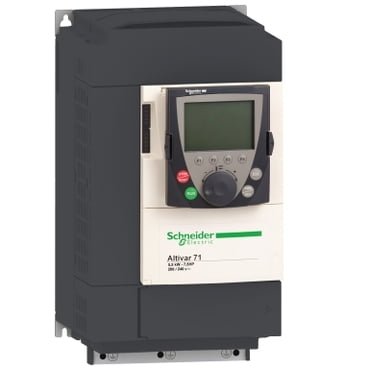
Many trips come down to a number being outside its window. Here are the published figures for the ATV71HU75N4Z 7.5 kW drive.
| Spec | Value |
|---|---|
| Motor power | 7.5 kW (10 hp), 3 phases |
| Supply voltage | 380 to 480 V (limits 323 to 528 V) |
| Line current | 27 A at 380 V, 22.2 A at 480 V |
| Nominal output current | 17.6 A at 380 V, 14 A at 460 V (4 kHz) |
| Transient current | 26.4 A for 60 s, 29 A for 2 s |
| Max motor cable length | 50 m shielded, 100 m unshielded |
| Braking torque | 30% without resistor, up to 150% with resistor |
| Operating temperature | -10 to 50 °C without derating |
| Altitude | 1,000 m without derating |
If your supply sits outside 323 to 528 V, expect OSF or USF. If your motor cable is longer than the figures above, expect trouble.
The Most Common Altivar 71 Faults
OCF: Overcurrent
The output current spiked past the limit.
- Check for a jam, a seized bearing or a load that has grown
- Check the acceleration ramp. Too short for the inertia is a classic cause
- Confirm the drive is sized for the motor
OLF: Motor Overload
The motor drew more current than its thermal setting allows, for too long. The further above the setting, the faster it trips.
- Compare the motor thermal current setting with the motor nameplate
- Check the load. A recurring OLF on the same machine is a load or motor problem
- Don’t just raise the setting to stop the trip
OHF: Drive Overheat
The heatsink got too hot. Schneider’s own support notes put the trip at about 100 °C on the heatsink.
- Check the heatsink fan is running
- Clean the heatsink and clear any blocked airflow
- Check the enclosure ventilation and the room temperature
- Rarely, the temperature sensor itself is faulty
OBF: Over-Braking
The motor pushed energy back into the drive faster than it could handle. It’s almost always a deceleration problem, not a failed drive.
- Extend the deceleration time
- Fit a braking resistor. This drive offers only 30% braking torque without one
- Check that the resistor and its wiring are intact
OSF, USF and PHF: Supply Faults
All three sit upstream of the drive.
- Measure the supply voltage under load, not just idle
- Check incoming terminals for looseness
- Look for a big motor or welder on the same feed that drags the line down at startup
- For PHF, check fuses and the upstream contactor
How to Reset an Altivar 71 Fault
Do not reset until you know why it tripped. Once the cause is fixed, you can reset by:
- Cycling the input power
- Using a configured fault-reset input
- Resetting over the fieldbus
A code that returns right after restart means the cause is still there. Repeatedly clearing OCF or SCF to keep production moving is how a small problem becomes a burned motor.
When It Really Is the Drive
Most codes aren’t a failed drive. These are the exceptions:
- InF internal faults
- CrF precharge faults
- SCF that returns with the motor disconnected
A common test is to disconnect the motor and see if the fault comes back. If it does, suspect the drive.
If the unit does need replacing, check what you’re matching. Newer installs often use the ATV930 drive from the newer Altivar Process range. Older plants may still run an ATV58 drive. For fixed-speed loads that only need a smooth start, an ATS48 soft starter may be the better fit.
For more on the overheat code, see Schneider’s own OHF troubleshooting FAQ.
Frequently Asked Questions
Q: What does OCF mean on an Altivar 71? A: OCF is an overcurrent fault. The output current went past the limit. Check for a mechanical jam, then check that the acceleration ramp isn’t too short for the load.
Q: How do I reset an Altivar 71 fault? A: Fix the cause first. Then reset by cycling input power, using a configured reset input, or resetting over the fieldbus.
Q: Why does my Altivar 71 trip on OBF when it stops? A: The load is being decelerated faster than the drive can absorb the returned energy. Lengthen the deceleration time or fit a braking resistor.
Q: Can I keep resetting an OLF fault? A: Not safely. OLF means the motor is drawing too much current for too long. Resetting without fixing the load or the setting risks overheating the motor.
Q: Does a fault code mean the drive is broken? A: Usually not. Most codes point to the supply, the load, the motor cable or the cooling. A true internal fault such as InF is the exception.